

SQR-118
RSP user notifications#
Abstract
During operations of the Rubin Science Platform, we will frequently need to communicate with users, either collectively or individually. These communications include welcome pages and tool tips, broadcast messages, and per-user messages about usage or other specific issues. This technote proposes a technical framework for these user notifications and discusses related issues around analysis of user activity.
This design is built on SQR-060, which describes the broadcast notification system for the Rubin Science Platform and includes some earlier discussion of per-user notifications and other messaging options.
Requirements#
Types of notifications#
There are several different types of user notifications that will need separate treatment.
Application-initiated single-user messages#
Applications may need some way to notify a user of something specific to that user. For example, an application may want to report when a long-running background job or query has completed or was aborted.
One significant anticipated class of application-initiated messages are metrics-based usage and quota alerts. For some quota limits such as disk usage, users who are approaching that limit should receive a notification to that effect.
A special case of this, discussed further below, is automatically analyzing user usage patterns and setting tighter quotas or throttling their usage if their usage seems excessive over an extended period of time beyond the window of simple API throttling.
Administrator-initiated single-user messages#
These are essentially a special case of the previous category.
Rubin Science Platform administrators will need to send notifications to specific users or groups of users about their use of the platform, availability of new features that user specifically requested, or queries about unusual usage patterns. Allowing user responses to queries would be a nice additional feature, but is not discussed further in this initial design.
Broadcast messages to all users#
These messages are currently handled by Semaphore as discussed in SQR-060.
These are expected to remain largely unchanged in this design, except that we are considering adding a way for users to dismiss messages that they have already seen and don’t want to keep seeing. This may not be necessary, since we try to use broadcast messages sparingly, so it is not a firm requirement.
If we do add this feature, the dismissal mechanism needs to correctly handle repeating notifications. Dismissing the notification for one Patch Thursday (see SQR-056) maintenance window should not dismiss the following notification the next week.
Some broadcast messages may be sufficiently important that we don’t want to allow dismissal, such as ongoing outage notifications.
Formatting notifications#
As much as possible, notifications should use the same basic structure as the current broadcast messages, although since they will be created via API instead of through use of GitHub as a CMS, that information will be conveyed in JSON instead of a text file with a YAML metadata block.
We have extensive experience now with the Markdown formatting approach used for broadcast messages, and it seems to do what we want. The exact metadata fields will vary from those in broadcast messages, of course.
This implies that the message will have a summary and then a larger body, both of which will be formatted using Markdown.
Clients requesting the notifications for a specific user should have the option to receive them in either Markdown or HTML (or possibly always receive both). HTML is simpler for clients that are already HTML-based, but Markdown provides more formatting flexibility to the client.
Displaying notifications#
Notifications should, by default, be shown to the user via a notifications area on the home page of the Rubin Science Platform, provided by Squareone. Following the now-common design of many web sites, the initial proposed design is a bell icon with a red count badge of unread messages (if any). Clicking the icon brings up the user’s recent notifications, read and unread. It may be useful to have a “See all notifications” link that goes to a separate page that can display more history.
Due to screen space constraints, the pop-up list of recent notifications should probably display the summaries and allow the user to click on the message for more details, either by expanding the message inline in the display widget or by taking the user to a separate notifications page.
Some per-user notifications may be of suficient severity that they should also be shown as banner messages at the top of the home page, similar to the current broadcast messages.
In the future, we may also want to integrate notifications with the Discourse discussion forums at community.lsst.org so that the user can receive direct messages for important notifications, thus triggering email notification. This would require some way of mapping RSP users to Discourse users.
We also may want to send the most important notifiations to the user via email. Neither Discourse nor email integration are discussed in detail in this technote.
Browser notifications#
Most browsers now support browser notifications, which allow users to permit web sites to send notifications even if that site is not currently loaded. Squareone should add support for providing user notifications via browser notifications. This is a lower priority than providing the notification icon and interactive browser interface.
Clearing notifications#
Notifications should be removed if the issue prompting the notification has been resolved. For example, if a user is being rate-limited due to quotas and their quota is increased or their number of requests drops so that they are no longer being rate-limited, the corresponding notification should be suppressed automatically and fairly quickly to avoid misleading the user.
Notifications may also have an expiration time, and should not be displayed to the user after that time.
Proposed design#
The proposed design builds on the existing Semaphore service, expanding it to provide a REST API to notification publishers as well as UIs that want to display notifications.
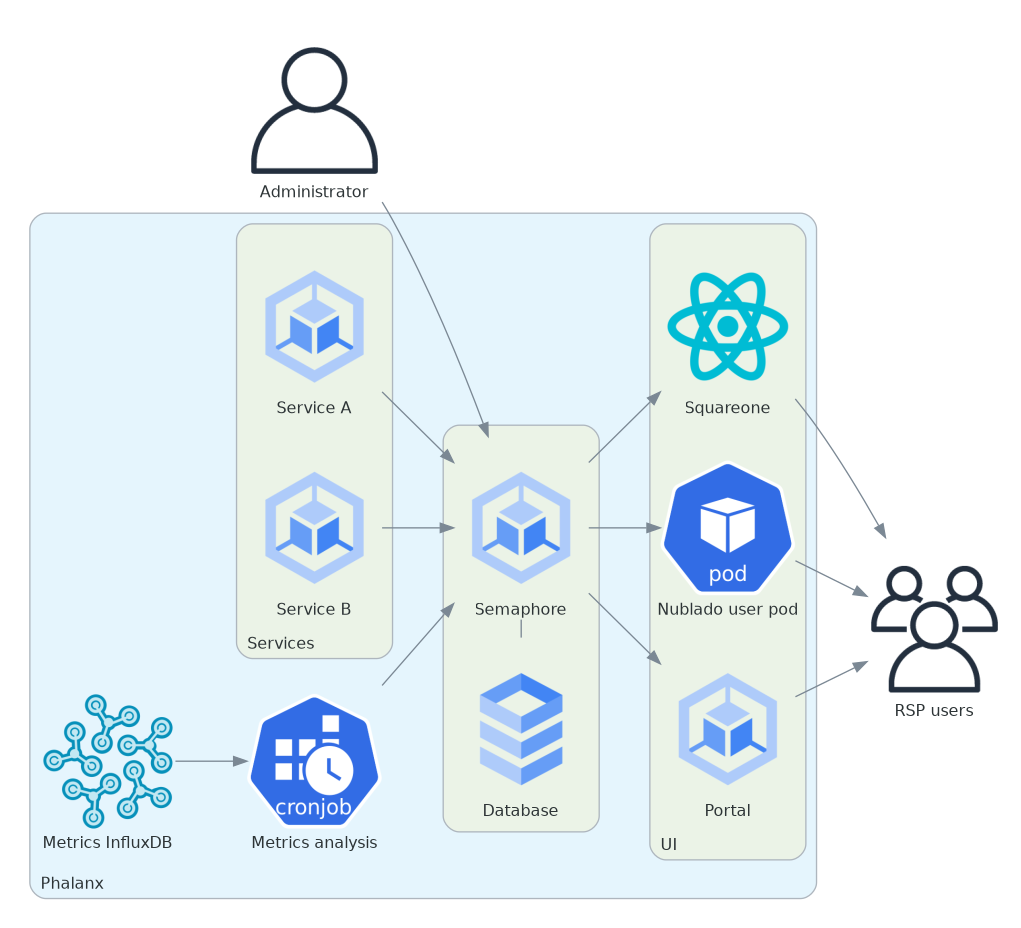
Applications, metrics analysis cron jobs, and administrators can all create notifications via the REST API, which are stored in a database. UIs (in the initial design, only Squareone) query for notifications via a separate REST API, and can also use a POST API to record that the user has seen a notification or dismissed a message.
Data model#
There are two high-level possibilities for the data model for application- and metrics-triggered user notifications:
The originating application constructs a formatted message in Markdown and sends that to Semaphore. Semaphore stores the originating application, target user (if not broadcast), and a unique notification identifier, but otherwise works only with formatted messages.
The originating application sends structured data to Semaphore, which stores the original structured data by type of notification. Semaphore is responsible for turning that structured data into a formatted Markdown message for the user that is handed to UIs when they query Semaphore for user notifications.
There is also a compromise position between the two, where the originating application provides a template and a set of variables as key/value pairs. This keeps responsibility for the formatting in the application but allows the application to search for notifications via semi-structured data.
While both approaches have advantages and disadvantages, we’ve chosen to manage the templates in each application that wants to send user notifications and have Semaphore track only formatted messages.
Application-managed templates#
The first possibility makes it easier to add new notifications, since no changes to Semaphore are required. Each application fully controls its formatting.
However, to revoke a notification, the application has to find it again. This may mean that it has to keep a local record of what notifications it sent or attempt to recover that information by querying the API.
The compromise approach makes that querying easier by allowing the application to query by key/value pairs, but it still puts most of the work on each originating application while adding somewhat more complexity to the data model and to the API.
In this approach, the code to manage application notifications will have to be duplicated in all the applications that send and want to revoke notifications, although some of it could be collected into a library. This provides the most flexibility and keeps the Semaphore layer simple and focused only on distributing messages, at the cost of higher application complexity.
We’ve chosen this approach.
Semaphore-managed templates#
The alternative approach is for Semaphore to know about each type of message that could be sent and to accept from the client structured data specific to that type of message. This allows Semaphore to provide a structured query API for each type of message to the originating application, allowing the application to use Semaphore directly as its data store for current notifications. That, in turn, makes it easier for an application to find notifications that are no longer relevant and should be dismissed, without keeping local state recording all of the notifications it has issued.
This approach also makes Semaphore the keeper of all templates for all notifications, which means all user communications can be updated in one place. This may or may not be more convenient in practice than putting the relevant templates in each originating application.
With this approach, Semaphore would store the structured data for various types of notifications, which may make it easier for administrators to analyze and characterize the types and volume of notifications being issued.
This approach has significant drawbacks, however. It makes Semaphore more complicated and requires that it understand the semantics of messages and format them for the user, rather than simply being a store and forward message bus. It also requires changes to both Semaphore and the originating application when adding new alerts, including in many cases a new Semaphore route, models, and database migration to add a new table for a new type of structured alert data.
Taking actions based on metrics#
Many of the usage policies that we may wish to impose are not easy to calculate inside individual applications without retaining a lot of state. For example, we may be happy for a user to perform lots of Butler queries and pull lots of images when they are actively working on an analysis, but we may not want users to automate the download of millions of images. Distinguishing between these cases in the Butler server would require tracking per-user usage counters, which would be annoying additional state tracking.
We already export per-user statistics of this type to InfluxDB via Sasquatch. Rather than add additional state tracking to each application, and find a way to do cross-application state tracking where relevant, we can instead trigger such actions from InfluxDB queries.
For more discussion of this use case, see SQR-119.
User interfaces#
Squareone already has a mechanism for displaying banner notifications using the existing Semaphore API. To show the new notification icon on the front page, it should make an authenticated request to the new Semaphore API to get per-user notifications. This is separate from the existing API for banner notifications.
The Semaphore API should be designed to return the information necessary for generating the home page of Squareone in a single response. The UI design should drive whether the full body of the message is included in the top-level API response or whether only the summaries are included and the full message must be retrieved via a separate API call.
If dismissal of banner notifications is implemented, Squareone should make an authenticated call (as the user) to Semaphore for banner notifications as well, instead of the unauthenticated API, so that Semaphore can provide dismissal information.
When the user requests their full notification history, that response may be paginated depending on the number of notifications that user has received. Very old notifications (more than three months ago) may be discarded to avoid indefinite database growth.
Semaphore will need correct handling of CORS preflight checks to allow authenticated requests, since Semaphore may be in a different origin than Squareone going forward.
The Semaphore API for user interfaces should return the notifications rendered in HTML so that the various user interfaces don’t have to handle the conversion from Markdown.
Proposed API#
This is an early draft and will probably change during implementation. It does not (yet) include an API for dismissing broadcast messages or for managing welcome and introductory messages.
For applications#
These routes will use a new scope, notifications:write, to limit access to only applications with that scope.
POST /semaphore/v1/senders/<application>/notificationsCreate a new user notification. The body must be JSON with some or all of the following fields:
userUsername of user to whom to send the notification.
summarySummary line of the notification. Markdown with only in-line markup allowed.
body(optional)Body of the notification if there is more to the notification beyond the summary. May use any Markdown formatting.
expires(optional)Date and time when the notification should expire. At this point the notification will disappear as if it were not sent and will no longer be shown to the user.
We may also want to add an urgency field and a flag indicating whether to show the notification as a banner message as well as a regular notification.
The
<application>portion of the URL must match the authenticated identity of the application (via Gafaelfawr token).GET /semaphore/v1/senders/<application>/notificationsRetrieve notifications sent by this application. Only notifications created by the authenticated identity sending the message will be returned.
The model returned will be the same model sent when creating the notification, plus additional fields that are added automatically:
idA unique identifier for this notification.
createdCreation date of the notification.
We may add query parameters to allow searching for notifications by structured data. This initially would be the recipient username, but could include other structured data depending on whether we adopt a data model with a structured format.
For administrators#
These routes will be restricted to a new admin:notifications scope.
POST /semaphore/v1/admin/notificationsThe same as the application notiication creation API above, except this API creates administrator notifications and is only accessible with an appropriate Gafaelfawr role.
GET /semaphore/v1/admin/notificationsLists all administrator notifications.
GET /semaphore/v1/sendersLists all of the notification senders with notifications recorded in the system. Administrators can use this to navigate the full list of notifications from the sender’s perspective.
Administrators also have access to the application API for any application.
For user interfaces#
These routes allow any scope, but only return the notifications for the authenticated user.
GET /semaphore/v1/notificationsRetrieves the notifications for the current authenticated user. The body will be a list of JSON objects with the following fields:
idThe unique identifier of the notification.
urlURL to the full notification (see below).
createdCreation date of the notification.
summarySummary line of the notification. This will be an object with two fields,
gfmandhtml, which contain the Markdown and HTML-formatted summary respectively.seenWhether this notification has been previously marked as seen.
GET /semaphore/v1/users/<username>/notifications/<id>Retrieves the full notification for a given user. The URLs in the summary returned above will point to this route. This returns the same information as the summary list, plus the following fields:
bodyFull body of the notification. This will be an object with two fields,
gfmandhtml, which contain the Markdown and HTML-formatted summary respectively.expires(optional)When the message expires, if it does.
POST /semaphore/v1/users/<username>/seenMark a set of notifications as seen by the user. The body should be a list of notification ids as returned in the
idfield.
Discussion#
Message bus versus API#
On first glance, application-triggered notifications seemed like a natural fit for a message bus such as Kafka. Applications could send a notification message, which would then be consumed by some other service and added to the user’s notifications list and API results used by UIs that display notifications.
The problem with this design comes with revoking notifications. Message buses are best for fire-and-forget messages that the sender does not have to interact with further. This notification design requires that applications be able to revoke their notifications when the condition prompting the notification has gone away.
This can be done in a message bus architecture with a subsequent cancellation message sent over the same message bus, but this would require assigning unique identifiers to notifications and tracking those in the application so that it can look up and revoke a notification. It would also make it hard for the application to reconcile its current notification state with the service that provides notifications to UIs.
Given that, we decided we needed a more conventional REST API to a central notification service, which will allow each application to list its currently active notifications and revoke the ones that are no longer appropriate. Since the REST API would be needed anyway, it makes sense to also create notifications in the same way rather than splitting the API across multiple protocols.
Why not email from the start?#
Historically, notifications from other services were often done via email. The data.lsst.cloud instance of the Rubin Science Platform does collect and verify email addresses for each user. However, email is an unattractive default choice for operational designs in 2026 for several reasons:
Email spam and therefore email spam protection has become increasingly aggressive. Best practice for sending email is now to use a dedicated email service (increasing cost) that verifies the sender to increase the likelihood of successful delivery, and even when using such a service, a lot of email is filtered out as spam by major email providers.
The increase in phishing and other email-based attacks has made users rightfully more skeptical of email. Even if we can establish that email is genuine, conscientious users have to waste time and mental resources analyzing the email to ensure that it is valid.
Email is a separate context from the user’s work in the Rubin Science Platform and may not be timely or accessible while they’re working within the platform.
There is a long, slow decline of use of email for communications. Some users, particularly younger users, may not check email frequently.
We currently use banners on RSP home page for broadcast notifications. Building on this approach as the first implementation step seems better-tailored to the notification needs of the RSP. The notification is put in front of the user where they are working, and it clearly comes from the RSP and is not phishing. Users who only use APIs from outside the RSP aren’t reachable this way, however.
Email notifications would be valuable as a separate, additional notification path, particularly for important messages we don’t want the user to miss even if they are not actively using the RSP. We may therefore provide email notification for some subset of notifications as part of later development work. Options include using community.lsst.org direct messages, sending the email directly through some email sending provider, or enrolling users in a ticketing system so that we can create tickets and list the user as a notification contact.
Portal notifications#
Firefly, which provides the Portal aspect, currently has a limited facility to show a static banner message to users, but no support for dynamic user notifications. We will not be adding any further notification support to Firefly for this first round of development, but may consider it in the future.
Welcome and introductory messages#
Rubin Observatory staff who are responsible for helping new users learn how to use the platform have asked for a way to show users introductory and orientation information when they start using a new component of the system.
Currently, this is implemented for Nublado in the form of a landing page that is shown when they create a personal JupyterLab server. This approach has several drawbacks that we would like to fix:
The technical implementation causes a delay and a redirect of the user interface after opening the notebook, potentially interrupting work the user has already started in another tab.
Experienced users who have seen the welcome screen before have no way to dismiss it permanently.
The process of displaying the welcome screen is unnecessarily complicated and requires creating symlinks in the user’s home directory.
We want these messages to be dismissable and to honor a request from the user to never see the message again.
We considered integrating this into Semaphore as well, since Semaphore does similar tracking and dismissal of per-user notifications and could provide a central place where users could reset all introductory messages of this type. However, we decided to exclude it from the scope of this work as insufficiently similar and also a lower priority.
We are not sure that we are going to keep the introductory splash screen at all. If we do, we will use some Nublado-specific mechanism to allow the user to suppress it for now.
In the long run we may want a central system to implement a couple of useful features:
Users should be able to opt out of all welcome messages and educational pop-up messaging, including ones they have not yet seen, by saying that they are an expert.
Users should be able to reset the dismissal status of all such welcome and educational messages back to the state they would be in if they were a brand-new user of the Rubin Science Platform, and should be able to do this in a single place without having to go into each application and individually reset it.
However, this is a low priority and can be kept separate from the per-user notification work.